

- 版本 [version]
- 下载 59
- 文件大小 47508
- 文件计数 1
- 创建日期 2026年1月8日
- 最后更新 2026年9月21日
Kontext-提示词预设-NGA-多图互动流程
Kontext-提示词预设-NGA-多图互动流程:基于 FLUX Kontext、FLUX、SDXL 搭建的热门工作流方案,节点规模 40 个、连线 40 条。工作流主路径为 VAEDecode ×2、SaveImage ×2、PreviewImage ×2,配合 输出图像,默认输出 1024×1024;节点已按执行顺序排布,便于二次修改。主模型 clip_l.safetensors、t5xxl_fp8_e4m3fn_scaled.safetensors、flux/flux1-dev-kontext_fp8_scaled.safetensors。下载后直接导入即可使用,建议显存 12GB 起(建议 16GB 以上)。
- 主模型:clip_l.safetensors、t5xxl_fp8_e4m3fn_scaled.safetensors、flux/flux1-dev-kontext_fp8_scaled.safetensors
- 核心节点:VAEDecode ×2、SaveImage ×2、PreviewImage ×2
- 输出形式:输出图像 · 1024×1024
- 规模:40 节点 / 40 连线
- 建议显存:12GB 起(建议 16GB 以上)
- 适用场景:站内热度最高的通用工作流合集,覆盖溶图、打光、放大与视频。
工作流节点图
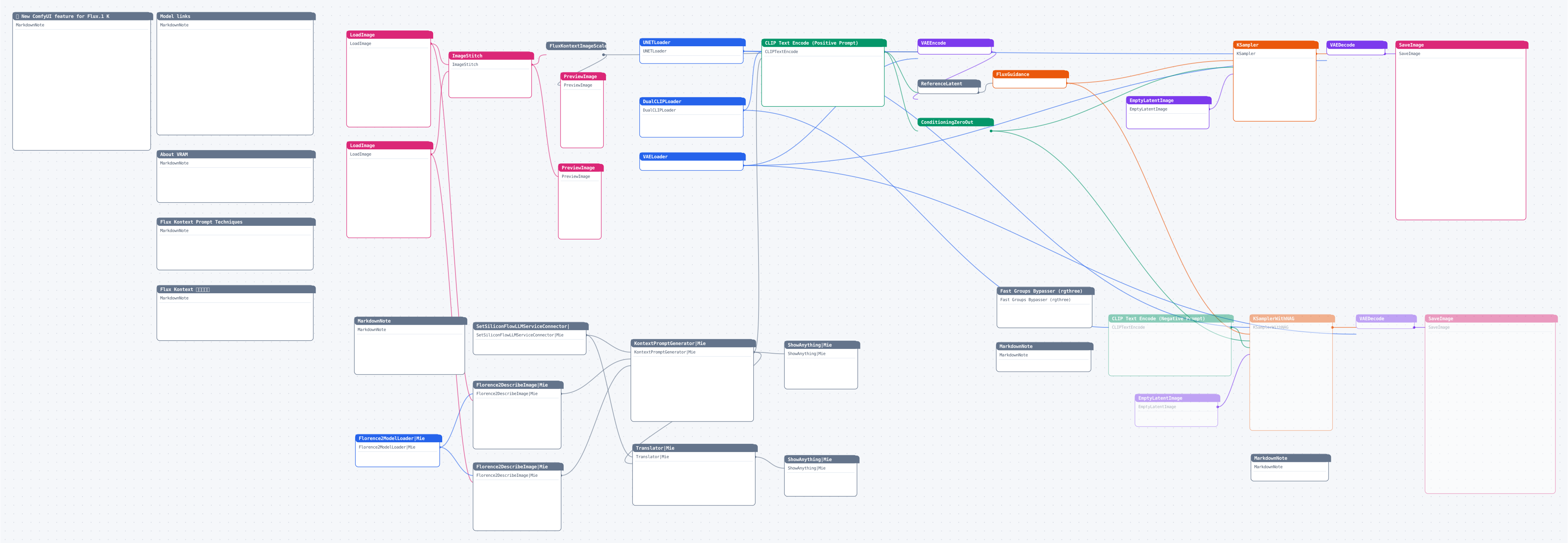
图较大可横向滚动;点击图片查看高清矢量原图(浏览器中可自由缩放)。
资源头图
使用说明
下载工作流文件后在 ComfyUI 中直接拖入画布(或菜单 Load 导入)即可运行;缺失的自定义节点用 ComfyUI Manager 一键安装,模型按文件名放入对应的 models 目录。
源码预览
{
    "id": "64093685-32ad-42a7-963b-054f3b9dc272",
    "revision": 0,
    "last_node_id": 271,
    "last_link_id": 495,
    "nodes": [
        {
            "id": 185,
            "type": "MarkdownNote",
            "pos": [
                -3116.22314453125,
                1644.9864501953125
            ],
            "size": [
                510,
                170
            ],
            "flags": [],
            "order": 0,
            "mode": 0,
            "inputs": [],
            "outputs": [],
            "title": "About VRAM",
            "properties": [],
            "widgets_values": [
                "For reference:n- **fp8_scaled**: Requires about 20GB of VRAM.n- **Original**: Requires about 32GB of VRAM.nn---nn供参考:n-  **fp8_scaled** :  大概需要 20GB 左右 VRAM n- **原始权重**:  原始权重,大概需要 32GB 左右 VRAM n"
            ],
            "color": "#432",
            "bgcolor": "#653"
        },
        {
            "id": 186,
            "type": "MarkdownNote",
            "pos": [
                -3116.22314453125,
                1864.986328125
            ],
            "size": [
                510,
                170
            ],
            "flags": [],
            "order": 1,
            "mode": 0,
            "inputs": [],
            "outputs": [],
            "title": "Flux Kontext Prompt Techniques",
            "properties": [],
            "widgets_values": [
                "n## Flux Kontext Prompt Techniquesnn### 1. Basic Modificationsn- Simple and direct: `"Change the car color to red"`n- Maintain style: `"Change to daytime while maintaining the same style of the painting"`nn### 2. Style Transfern**Principles:**n- Clearly name style: `"Transform to Bauhaus art style"`n- Describe characteristics: `"Transform to oil painting with visible brushstrokes, thick paint texture"`n- Preserve composition: `"Change to Bauhaus style while maintaining the original composition"`nn### 3. Character Consistencyn**Framework:**n- Specific description: `"The woman with short black hair"` instead of "she"n- Preserve features: `"while maintaining the same facial features, hairstyle, and expression"`n- Step-by-step modifications: Change background first, then actionsnn### 4. Text Editingn- Use quotes: `"Replace 'joy' with 'BFL'"`n- Maintain format: `"Replace text while maintaining the same font style"`nn## Common Problem Solutionsnn### Character Changes Too Muchn❌ Wrong: `"Transform the person into a Viking"`n✅ Correct: `"Change the clothes to be a viking warrior while preserving facial features"`nn### Composition Position Changesn❌ Wrong: `"Put him on a beach"`n✅ Correct: `"Change the background to a beach while keeping the person in the exact same position, scale, and pose"`nn### Style Application Inaccuracyn❌ Wrong: `"Make it a sketch"`n✅ Correct: `"Convert to pencil sketch with natural graphite lines, cross-hatching, and visible paper texture"`nn## Core Principlesnn1. **Be Specific and Clear** - Use precise descriptions, avoid vague termsn2. **Step-by-step Editing** - Break complex modifications into multiple simple stepsn3. **Explicit Preservation** - State what should remain unchangedn4. **Verb Selection** - Use "change", "replace" rather than "transform"nn## Best Practice Templatesnn**Object Modification:**n`"Change [object] to [new state], keep [content to preserve] unchanged"`nn**Style Transfer:**n`"Transform to [specific style], while maintaining [composition/character/other] unchanged"`nn**Background Replacement:**n`"Change the background to [new background], keep the subject in the exact same position and pose"`nn**Text Editing:**n`"Replace '[original text]' with '[new text]', maintain the same font style"`nn>
… (完整内容请下载文件查看)
代码较长,以上仅前 3800 字符 —— 点击下方按钮下载完整 JSON。
