

- 版本 [version]
- 下载 43
- 文件大小 109516
- 文件计数 1
- 创建日期 2025年9月25日
- 最后更新 2026年9月20日
电商换背景-应用版-中阶测试
电商换背景-应用版-中阶测试 是一套面向换脸换装场景的 ComfyUI 工作流,全图共 67 个节点、83 条连线。链路以 PreviewImage ×15、Image Levels Adjustment ×14、Image Blending Mode ×5 为主干,输出图像,适合需要稳定批量出图的同学。主模型 segmentation_mask_brushnet_ckpt.safetensors。下载后直接导入即可使用,建议显存 8GB 起。
- 主模型:segmentation_mask_brushnet_ckpt.safetensors
- 核心节点:PreviewImage ×15、Image Levels Adjustment ×14、Image Blending Mode ×5
- 输出形式:输出图像
- 规模:67 节点 / 83 连线
- 建议显存:8GB 起
- 适用场景:人物换脸、虚拟试衣、商品换装与背景替换,电商模特图的主力玩法。
工作流节点图
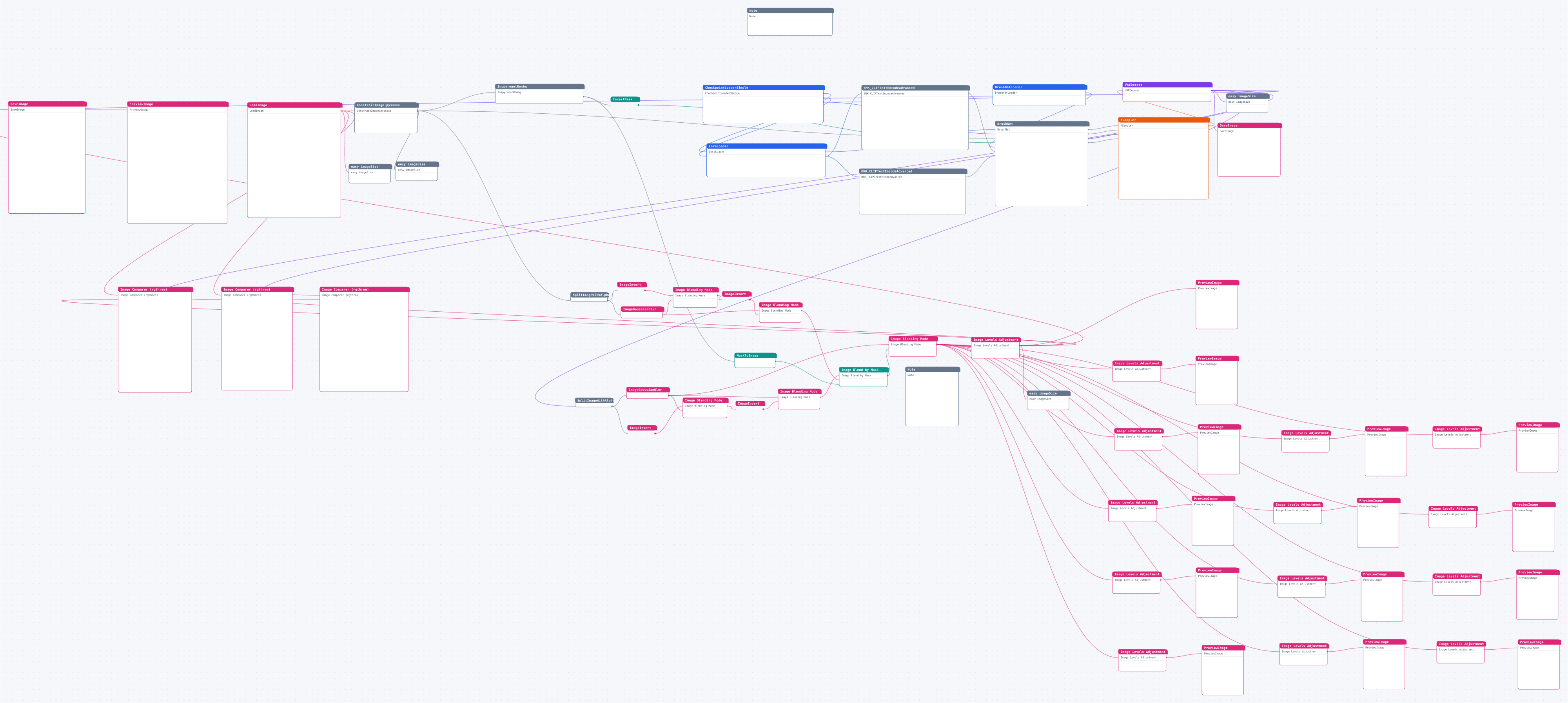
图较大可横向滚动;点击图片查看高清矢量原图(浏览器中可自由缩放)。
资源头图

使用说明
下载工作流文件后在 ComfyUI 中直接拖入画布(或菜单 Load 导入)即可运行;缺失的自定义节点用 ComfyUI Manager 一键安装,模型按文件名放入对应的 models 目录。
源码预览
{
    "last_node_id": 231,
    "last_link_id": 355,
    "nodes": [
        {
            "id": 67,
            "type": "BNK_CLIPTextEncodeAdvanced",
            "pos": [
                -5762.4287109375,
                745.279296875
            ],
            "size": [
                535.7697143554688,
                228.1288299560547
            ],
            "flags": [],
            "order": 9,
            "mode": 0,
            "inputs": [
                {
                    "name": "clip",
                    "type": "CLIP",
                    "link": 300,
                    "label": "CLIP"
                }
            ],
            "outputs": [
                {
                    "name": "CONDITIONING",
                    "type": "CONDITIONING",
                    "links": [
                        297
                    ],
                    "slot_index": 0,
                    "shape": 3,
                    "label": "条件"
                }
            ],
            "properties": {
                "Node name for S&R": "BNK_CLIPTextEncodeAdvanced"
            },
            "widgets_values": [
                "nsfw, ng_deepnegative_v1_75t,badhandv4, (worst quality:2), (low quality:2), (normal quality:2), lowres,watermark, monochrome",
                "none",
                "A1111"
            ],
            "_widget_cache_map": [],
            "color": "#322",
            "bgcolor": "#533",
            "category": "Custom Nodes"
        },
        {
            "id": 110,
            "type": "InspyrenetRembg",
            "pos": [
                -7591,
                320
            ],
            "size": [
                440.9767150878906,
                99.40369415283203
            ],
            "flags": [],
            "order": 10,
            "mode": 0,
            "inputs": [
                {
                    "name": "image",
                    "type": "IMAGE",
                    "link": 313,
                    "slot_index": 0,
                    "label": "image"
                }
            ],
            "outputs": [
                {
                    "name": "IMAGE",
                    "type": "IMAGE",
                    "links": [],
                    "slot_index": 0,
                    "shape": 3,
                    "label": "IMAGE"
                },
                {
                    "name": "MASK",
                    "type": "MASK",
                    "links": [
                        193,
                        240
                    ],
                    "slot_index": 1,
                    "shape": 3,
                    "label": "MASK"
                }
            ],
            "properties": {
                "Node name for S&R": "InspyrenetRembg"
            },
            "widgets_values": [
                "on"
            ],
            "_widget_cache_map": [],
            "category": "Custom Nodes"
        },
        {
            "id": 84,
            "type": "Note",
            "pos": [
                -6325,
                -62
            ],
            "size": [
                427.7880859375,
                138.90699768066406
            ],
            "flags": [],
            "order": 0,
            "mode": 0,
            "inputs": [],
            "outputs": [],
            "properties": {
                "text": ""
            },
            "widgets_values": [
                "新手只需要修改提示词即可,如需要强化效果可以启用LORA加上对应lora控制。nn导入的产品图最好是白底图或者透明底的,在画面中的位置要自己调整好,可以ps加个白底,产品占画面总面积大小不要超过30%,效果不好的话可以尝试缩小点产品试试。"
            ],
            "_widget_cache_map": [],
            "color": "#432",
            "bgcolor": "#653",
            "category": "Primitive Nodes"
        },
        {
            "id": 47,
            "type": "CheckpointLoaderSimple",

… (完整内容请下载文件查看)
代码较长,以上仅前 3800 字符 —— 点击下方按钮下载完整 JSON。
