

- 版本 [version]
- 下载 65
- 文件大小 74037
- 文件计数 1
- 创建日期 2026年6月11日
- 最后更新 2026年9月20日
证件照一键生成
证件照一键生成:基于 Qwen-Image 搭建的电商图片方案,节点规模 28 个、连线 34 条。工作流主路径为 easy promptReplace ×2、CR Text ×2、SaveImage ×2,配合 输出图像,默认输出 720×1280;节点已按执行顺序排布,便于二次修改。主模型 qwen_2.5_vl_7b_fp8_scaled.safetensors、qwen_image_vae.safetensors、FireRed-Image-Edit-1.1_fp8mixed_comfy.safetensors。已挂载 LoRA:Qwen-Image-Lightning-8steps-V2.0-bf16.safetensors。下载后直接导入即可使用,建议显存 12GB 起(建议 16GB 以上)。
- 主模型:qwen_2.5_vl_7b_fp8_scaled.safetensors、qwen_image_vae.safetensors、FireRed-Image-Edit-1.1_fp8mixed_comfy.safetensors
- LoRA / 适配器:Qwen-Image-Lightning-8steps-V2.0-bf16.safetensors
- 核心节点:easy promptReplace ×2、CR Text ×2、SaveImage ×2
- 输出形式:输出图像 · 720×1280
- 规模:28 节点 / 34 连线
- 建议显存:12GB 起(建议 16GB 以上)
- 适用场景:多角度产品展示图、证件照与老照片修复等电商批量出图方案。
工作流节点图
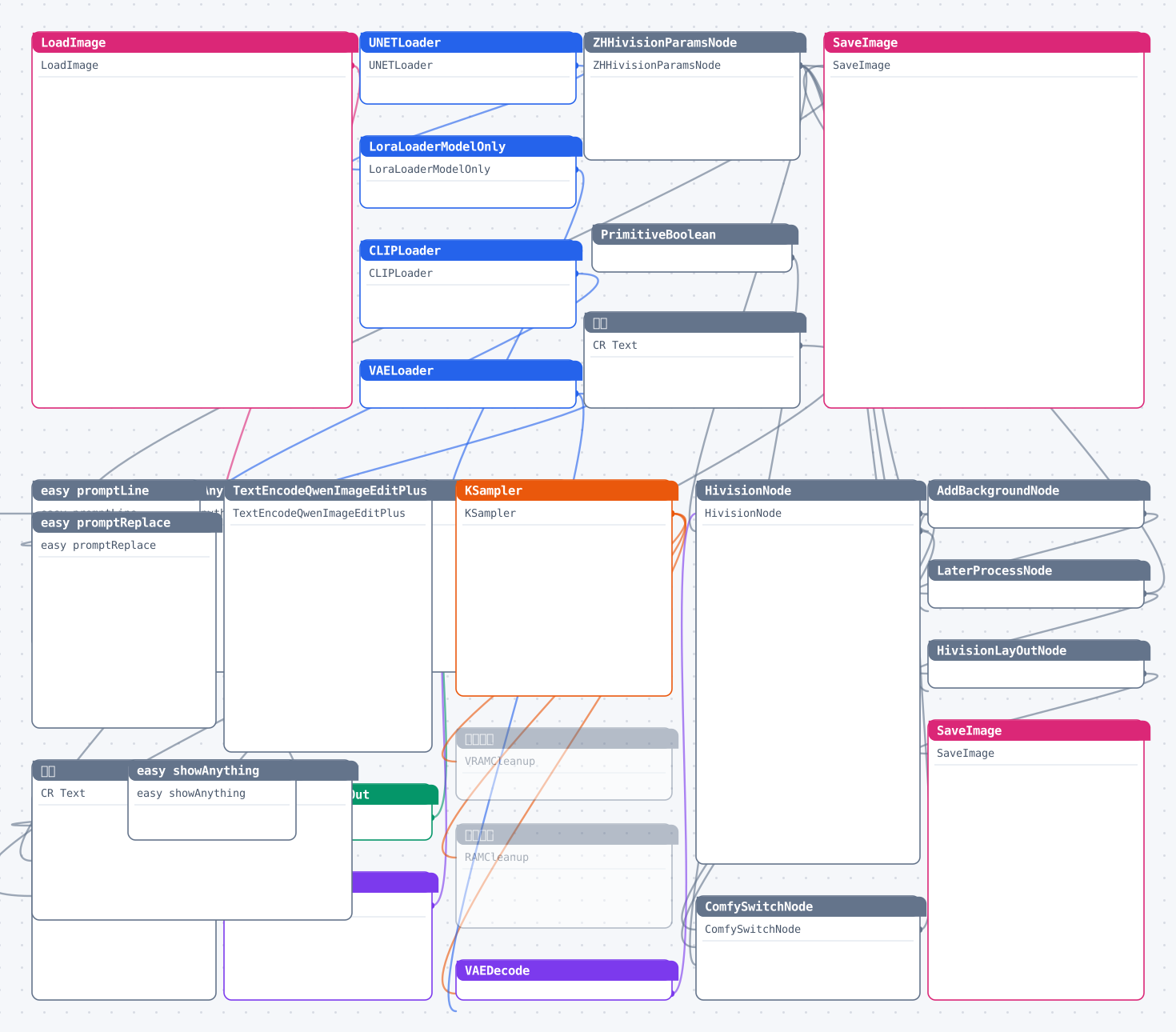
图较大可横向滚动;点击图片查看高清矢量原图(浏览器中可自由缩放)。
资源头图
使用说明
下载工作流文件后在 ComfyUI 中直接拖入画布(或菜单 Load 导入)即可运行;缺失的自定义节点用 ComfyUI Manager 一键安装,模型按文件名放入对应的 models 目录。
源码预览
{
    "id": "5a9a79a9-e90c-4f5c-a0dd-4f1d3030d79e",
    "revision": 0,
    "last_node_id": 28,
    "last_link_id": 34,
    "nodes": [
        {
            "id": 1,
            "type": "CLIPLoader",
            "pos": [
                480,
                800
            ],
            "size": [
                270,
                110
            ],
            "flags": [],
            "order": 0,
            "mode": 0,
            "inputs": [],
            "outputs": [
                {
                    "name": "CLIP",
                    "type": "CLIP",
                    "links": [
                        31
                    ]
                }
            ],
            "properties": {
                "cnr_id": "comfy-core",
                "ver": "0.18.1",
                "Node name for S&R": "CLIPLoader",
                "ue_properties": {
                    "widget_ue_connectable": [],
                    "input_ue_unconnectable": [],
                    "version": "7.7"
                }
            },
            "widgets_values": [
                "qwen_2.5_vl_7b_fp8_scaled.safetensors",
                "qwen_image",
                "default"
            ],
            "gradientSettings": {
                "gradientColors": [
                    "#ed7dbd",
                    "#8de1ec",
                    "to bottom right"
                ],
                "bgGradientColors": [
                    "#ed7dbd",
                    "#8de1ec"
                ],
                "bgGradientDirection": "to bottom right",
                "titleGradientColors": [
                    "#000000"
                ],
                "titleGradientDirection": "to right",
                "enableTitleGradient": true,
                "titleTextAlign": "left",
                "titleTextY": 0,
                "borderRadius": 8,
                "fontColor": "#ffffff",
                "fontSize": 14,
                "titleImage": null,
                "collapseButtonColor": "#05d9e8",
                "_isGradientControlled": true,
                "_gradientPluginVersion": "2.0"
            }
        },
        {
            "id": 2,
            "type": "VAELoader",
            "pos": [
                480,
                950
            ],
            "size": [
                270,
                60
            ],
            "flags": [],
            "order": 1,
            "mode": 0,
            "inputs": [],
            "outputs": [
                {
                    "name": "VAE",
                    "type": "VAE",
                    "links": [
                        5,
                        32
                    ]
                }
            ],
            "properties": {
                "cnr_id": "comfy-core",
                "ver": "0.18.1",
                "Node name for S&R": "VAELoader",
                "ue_properties": {
                    "widget_ue_connectable": [],
                    "input_ue_unconnectable": [],
                    "version": "7.7"
                }
            },
            "widgets_values": [
                "qwen_image_vae.safetensors"
            ],
            "gradientSettings": {
                "gradientColors": [
                    "#ed7dbd",
                    "#8de1ec",
                    "to bottom right"
                ],
                "bgGradientColors": [
                    "#ed7dbd",
                    "#8de1ec"
                ],
                "bgGradientDirection": "to bottom right",
                "titleGradientColors": [
                    "#000000"
                ],
                "titleGradientDirection": "to right",
                "enableTitleGradient": true,
                "titleTextAlign": "left",
                "titleTextY": 0,
                "
… (完整内容请下载文件查看)
代码较长,以上仅前 3800 字符 —— 点击下方按钮下载完整 JSON。
