

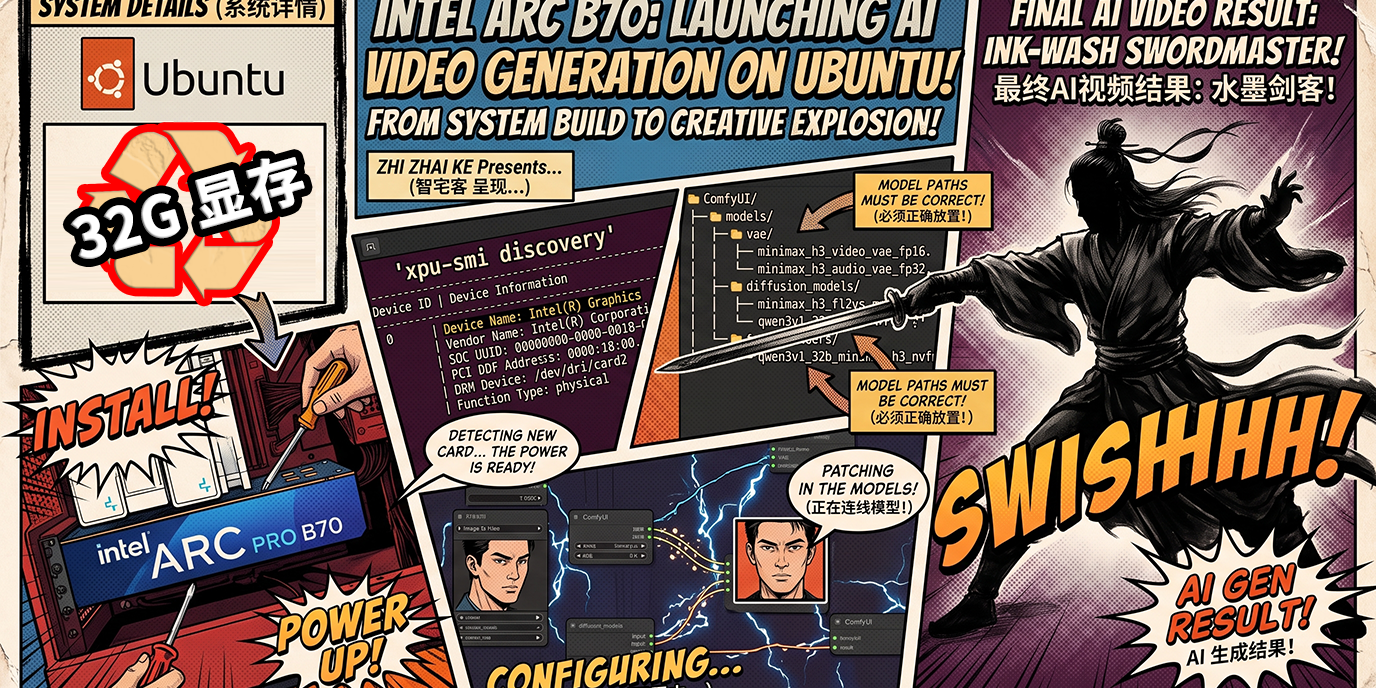
在人工智能日新月异的今天,AI视频生成技术正处于大爆发的阶段。从早期的模糊短片到如今可以媲美电影级画质的高清视频,技术的迭代速度令人咋舌。然而,长期以来,高质量的AI视频生成能力往往被束之高阁,掌握在少数拥有庞大算力集群的商业平台手中。普通创作者和开发者想要体验这些前沿技术,往往需要在各大付费平台上排队等候,并支付高昂的订阅费用或算力代币。
直到近期,MiniMax H3 视频生成模型的正式开源,彻底打破了这一僵局。它不仅为全球开发者提供了一个强大的开源替代方案,更标志着AI视频生成正式迈入“全民本地化”的新纪元。本文将深入剖析MiniMax H3的本地化部署实战,并为您揭秘一款极具性价比的隐藏“神器”——拥有32GB超大显存的 Intel Arc Pro B70 显卡,带您一步步在 ComfyUI 环境下打造属于自己的个人AI视频工作站。
第一章:开源风暴下的显存危机与破局之道
1.1 MiniMax H3 开源带来的行业巨震
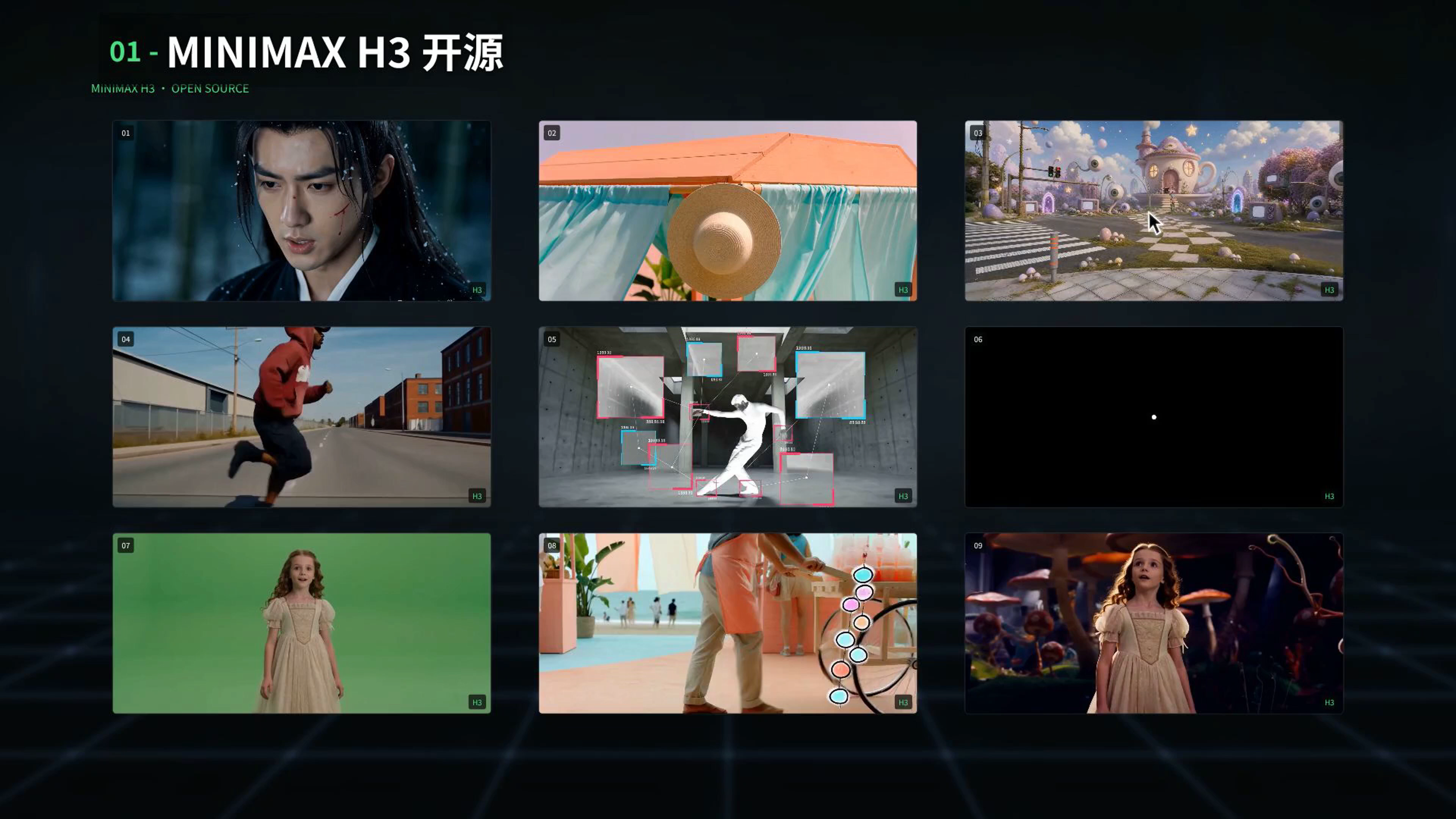
近期,MiniMax H3 毫无预兆地宣布开源,瞬间在AI圈引发了强烈地震。各大技术社区、论坛以及视频平台上,关于H3的评测视频如雨后春笋般涌现。简单来说,以往那些需要花钱、排队才能在云端平台生成的视频效果,现在任何人都可以免费下载模型,在本地机器上直接生成。
这一开源举措,将先进的文生视频(Text-to-Video)和图生视频(Image-to-Video)能力直接下放到了个人开发者和小型工作室手中。无论是用于影视预告片制作、商业广告视觉原型,还是自媒体短视频的批量生产,H3都展现出了极高的实用价值。
1.2 本地生成的拦路虎:显存容量
然而,理想很丰满,现实却很骨感。当热情高涨的网友们尝试将H3模型拉取到本地运行时,立刻被一个残酷的现实“劝退”——显存不足。
视频生成模型(尤其是基于Diffusion架构或更先进架构的模型)对显存(VRAM)的渴求是无底洞。在处理多帧连续图像、高分辨率渲染以及复杂的时空一致性计算时,显卡需要缓存海量的张量数据。如果显存不够,系统就会频繁触发 OOM(Out of Memory)错误,导致生成任务直接崩溃。
这一现象间接导致了市面上大显存显卡的价格一路狂飙。许多人甚至到了“一卡难求”的地步。为了能够在本地流畅运行H3,大家开始在市场上疯狂寻找高性价比的视频生成显卡。对于大多数个人创作者而言,动辄几万元的顶级专业卡显然超出了预算,而消费级游戏卡虽然算力强劲,但显存容量(如16GB、24GB)在应对长视频或高分辨率生成时又显得捉襟见肘。
第二章:性价比之选——Intel Arc Pro B70 32G显卡深度解析
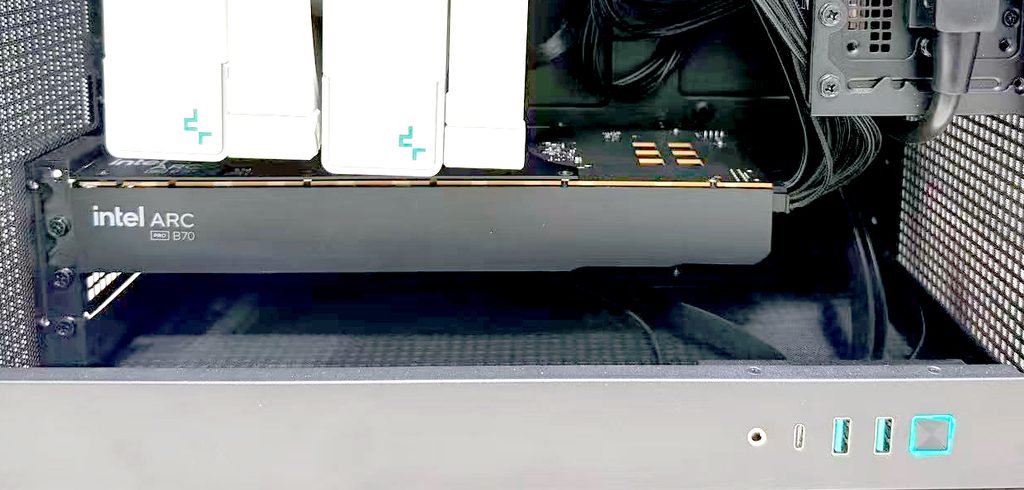
在众多的硬件方案中,一款平时较为低调的专业显卡进入了我们的视野,并在此次H3本地化部署中大放异彩——它就是 Intel 今年发布的 Arc Pro B70。
2.1 令人瞩目的 32GB 超大显存
Intel Arc Pro B70 最大的杀手锏在于其配备了高达 32GB 的显存。在当前AI创作环境下,显存容量往往比绝对算力更为关键。“算力决定生成速度的快慢,而显存决定了能不能跑起来。”
32GB的显存意味着它能够轻松吞下MiniMax H3庞大的模型参数,并在高分辨率(如1080P)视频生成过程中,提供充足的缓冲空间。相比之下,市面上主流的消费级显卡,即便是高端型号,往往也只有16GB或24GB显存,在处理类似任务时极易触碰显存红线。
2.2 极致的性价比
更为震撼的是它的价格。作为一张拥有32GB海量显存的专业级显卡,Intel Arc Pro B70 的售价仅在1万元人民币左右。相比于市场上那些动辄两三万甚至更高的24GB/48GB竞品,B70的性价比简直“爆棚”。
这对于那些想要组建本地多卡算力节点、或者打造高性能个人AI服务器的创作者来说,无疑是极具吸引力的选择。它让个人开发者也能以相对低廉的成本,触及高质量AI视频生成的门槛。
2.3 实测数据对比:性能不容小觑
为了客观评估 B70 的实际表现,我们进行了一系列密集的生成测试,并将其与市面上几款热门的高端显卡进行了对比。
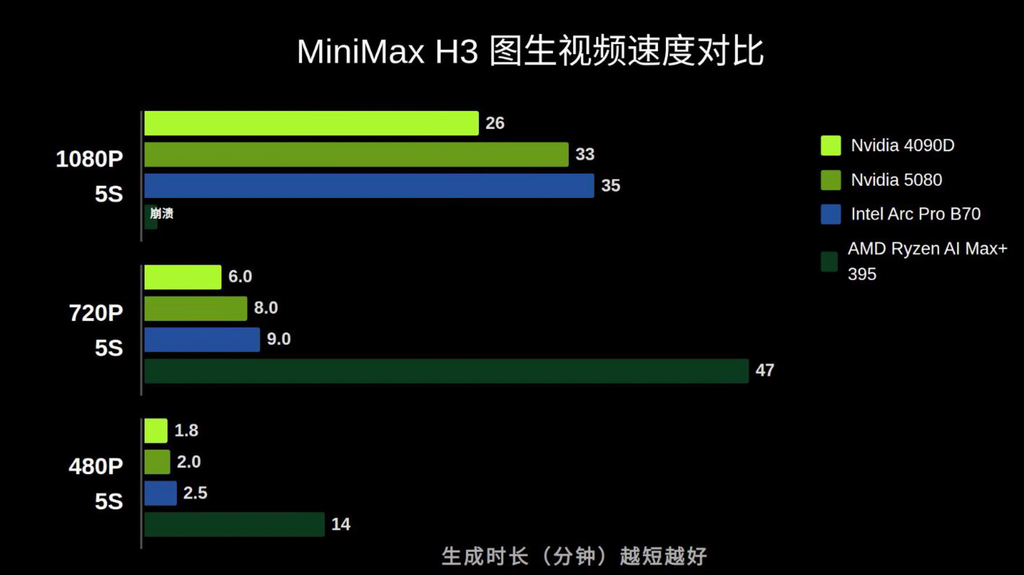
测试项目:使用 MiniMax H3 模型生成不同分辨率的 5秒 视频。
从图生视频(Image-to-Video)的速度对比数据中,我们可以清晰地看到:
- 1080P 分辨率 (5秒视频):
- Nvidia 4090D (24GB): 约 26 分钟
- Intel Arc Pro B70 (32GB): 约 33 分钟
- Nvidia 5080 (16GB): 约 35 分钟
- AMD Ryzen AI Max+ 395: 约 395 分钟(作为对照,集显/小机器在生产力场景下性能差距巨大)
- 720P 分辨率 (5秒视频):
- 4090D: 6.0 分钟
- 5080: 8.0 分钟
- Intel B70: 8.1 分钟
- 480P 分辨率 (5秒视频):
- 4090D: 1.8 分钟
- 5080: 2.0 分钟
- Intel B70: 2.5 分钟
数据解读:
B70 在生成速度上基本与 5080 处于同一梯队,虽然略逊于 4090D,但请注意核心差异——显存。B70 比 5080 足足多出了 16GB 显存,比 4090D 也多出了 8GB 显存!不仅如此,它的价格却比这些竞品便宜了一半还要多。
在进行大批量、高压力的视频生成测试时,B70 凭借 32GB 显存的优势,展现出了极高的稳定性,这正是当前 H3 本地生成最需要的核心竞争力。可以说是当前 H3 本地生成的“最佳拍档”。
第三章:从零开始——Ubuntu 24.04 基础环境与驱动部署
很多朋友可能会担心,非主流架构的显卡在软件生态和驱动支持上是否会比较折腾。其实大可不必担心。得益于 Intel 在开源生态上的持续投入,目前 B70 的部署流程已经高度标准化。

接下来,我们将以大家最为熟悉的 Ubuntu 24.04 操作系统为例,手把手教大家如何搭建 B70 的底层环境。整体步骤非常简单,几乎全是基础的命令行复制粘贴。
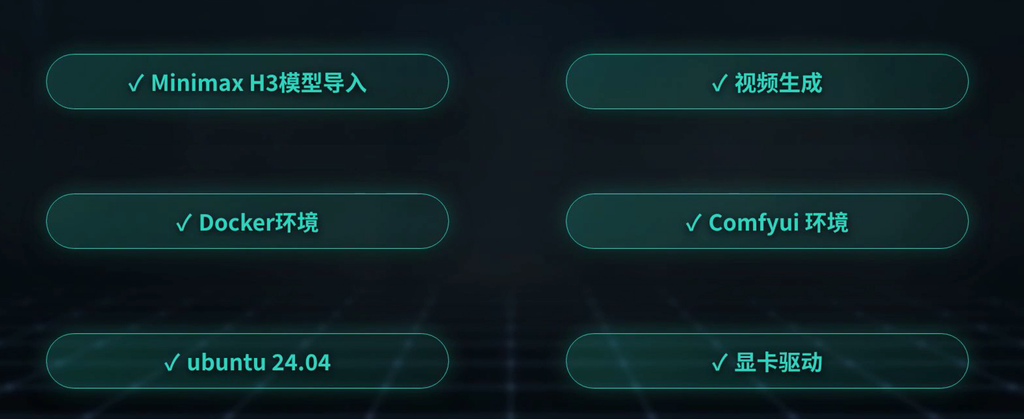
部署流程分为以下几个核心步骤:
- 操作系统环境准备 (Ubuntu 24.04)
- 显卡驱动安装
- Docker 环境配置
- ComfyUI 容器环境部署
- MiniMax H3 模型导入
- 工作流视频生成
3.1 显卡驱动安装
为了方便操作,我们可以提前将所需的离线安装包(Combo包)下载到本地存储或网盘中。
显卡驱动、docker安装、以及comfyui的下载地址:
链接:https://pan.quark.cn/s/8b6729224163 提取码:Z95H
- 打开 Ubuntu 的终端(Terminal)。
- 定位到驱动安装包所在的目录。
- 运行安装脚本。通常,安装包内会提供一个类似于
install.sh的脚本文件。 - 执行后,脚本会自动处理各项依赖项的安装和组件的配置。整个过程全自动进行,无需复杂的人工干预。
3.2 验证驱动状态
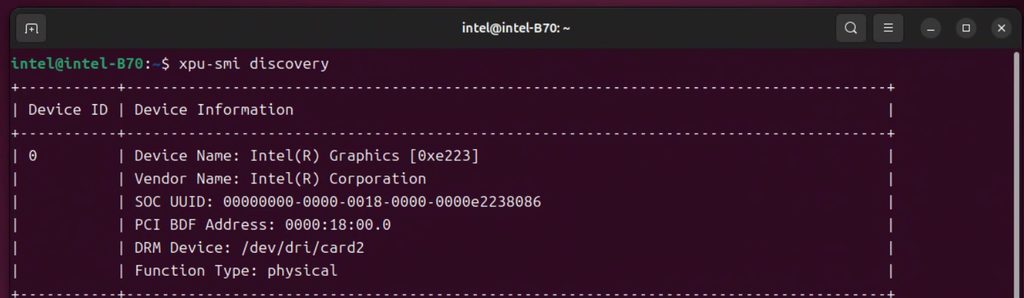
安装完成后,我们需要验证显卡是否被系统正确识别。在终端中输入以下命令:
xpu-smi discovery
如果终端返回了 Intel Arc Graphics 相关的设备信息(包括 Device ID、PCI BDF Address 等),则说明底层驱动已经就绪。这相当于 NVIDIA 环境下的 nvidia-smi 命令。
3.3 安装 Docker 容器环境
在现代 AI 开发部署中,Docker 已经是不可或缺的工具。它可以将复杂的 Python 依赖、CUDA/ROCm/OneAPI 环境以及应用本身打包在一起,实现环境隔离和一键部署,彻底告别“在我的电脑上能跑”的尴尬。
内含 Docker 最新稳定版全套:docker-ce 29.7.2 + containerd.io 2.3.3 + cli + buildx + compose。

直接把下边的东西复制到命令行,执行就行。 -- 请保证目录为当前目录
/////////////////////////////////////////////////////////////////////////////


# 1. 解压
tar -xzf docker-offline-ubuntu24.04-amd64.tar.gz
cd docker-offline-ubuntu24.04-amd64

# 2. 一键安装
sudo bash install.sh
以上为 “Docker 安装”命令行
同样地,我们可以使用预先准备好的 Docker 离线包进行安装,依次执行解压和安装脚本即可。安装完成后,可以通过 docker --version 检查 Docker 是否安装成功。至此,我们的服务器基础环境就已经彻底打通。
第四章:构建 ComfyUI 核心节点与模型挂载
基础环境就绪后,我们正式进入 AIGC 创作者的“主阵地”——ComfyUI。ComfyUI 以其强大的节点式连线逻辑和极高的自定义扩展性,成为了当前 AI 视频生成领域的标准控制台。
4.1 加载专属镜像
为了让 ComfyUI 能够完美调用 Intel显卡的算力,我们需要加载专用的 Docker 镜像(例如包含了 Intel Scalable Omni 环境的镜像包)。
在终端中执行 docker load -i <镜像文件名.tar> 将镜像载入本地。
intel_llm-scaler-omni_0.2.0-b1.tar 是完整的镜像导出(标准 docker load 格式),自包含所有层,拿到后只需一条命令:

docker load -i intel_llm-scaler-omni_0.2.0-b1.tar

导入后镜像名就是 intel/llm-scaler-omni:0.2.0-b1,直接 docker run 就能用。不需要任何其他文件。


如果没有安装docker:

////////////////////////////////


# 第一步:Ubuntu 24.04 安装 Docker
# 官方一键脚本(最简单,推荐)
curl -fsSL https://get.docker.com | sudo sh

# 把自己加入 docker 组(免 sudo)
sudo usermod -aG docker $USER
# 重新登录或执行:newgrp docker
# 别用 sudo apt install docker.io——那是旧版包。用官方脚本装的是最新 docker-ce。

# 第二步:目录建议(建一个数据目录)
# 模型占大头,建议放大容量分区,和镜像分开:

mkdir -p ~/comfyui-data/{models,output,input,custom_nodes,user}
# 结构:

# ~/comfyui-data/
# ├── models/        # 模型(最占空间:checkpoints/loras/vae/controlnet...)
# ├── output/        # 生成的图
# ├── input/         # 输入图
# ├── custom_nodes/  # 自定义节点
# └── user/          # 用户设置和工作流
# 第三步:导入镜像
docker load -i intel_llm-scaler-omni_0.2.0-b1.tar

# 第四步:启动 + 目录映射

docker run -d \
  --name comfyui \
  --restart unless-stopped \
  -p 8188:8188 \
  -v ~/comfyui-data/models:/llm/ComfyUI/models \
  -v ~/comfyui-data/output:/llm/ComfyUI/output \
  -v ~/comfyui-data/input:/llm/ComfyUI/input \
  -v ~/comfyui-data/custom_nodes:/llm/ComfyUI/custom_nodes \
  -v ~/comfyui-data/user:/llm/ComfyUI/user \
  --device /dev/dri:/dev/dri \
  --ipc=host \
  --shm-size=16g \
  intel/llm-scaler-omni:0.2.0-b1 \
  /llm/entrypoints/start_comfyui.sh
# 各参数作用:

# -v 宿主机:容器内 —— 目录映射(冒号前是 Ubuntu 路径,后是容器内路径,不能改)
# --device /dev/dri —— 把 Intel GPU 设备透传给容器(必须,否则没显卡)
# --ipc=host --shm-size=16g —— 共享内存,ComfyUI/深度学习必需
# -p 8188:8188 —— 访问 http://对方IP:8188
# 启动后 docker logs -f comfyui 看日志,浏览器打开 http://localhost:8188 就能用。

#只需把模型放进对应的 ~/comfyui-data/models/ 子目录,容器里就自动可见。以上为“加载comfyui”命令行。
4.2 启动 ComfyUI 容器
使用 docker run 命令启动容器,并进行端口映射和目录挂载。这一步非常关键,我们需要将宿主机(物理机)上的模型文件夹、输出文件夹等映射到容器内部,以便于在宿主机上管理动辄几十 GB 的模型文件。
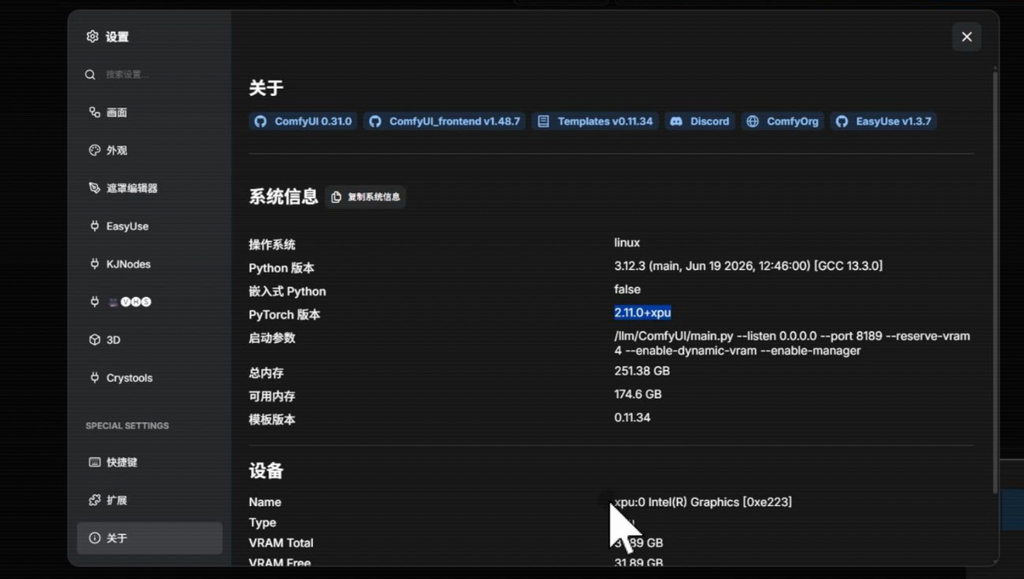
启动成功后,在浏览器中输入 IP地址:端口号 即可访问 ComfyUI 界面。在设置面板的“系统信息”中,可以看到操作系统为 Linux,并且设备列表里已经成功识别出 Intel Arc Graphics,可用显存显示为 31.89 GB。
4.3 精准放置 MiniMax H3 模型
这是很多新手容易卡壳的一步。MiniMax H3 的模型文件非常庞大,包含多个组件,必须放置在 ComfyUI 的指定路径下,才能被相应的节点正确识别。
以官方提供的模型结构为例,请确保您的文件目录如下排列:
ComfyUI/
└── models/
    ├── vae/
    │   ├── minimax_h3_video_vae_fp16.safetensors
    │   └── minimax_h3_audio_vae_fp32.safetensors
    ├── diffusion_models/
    │   └── minimax_h3_fl2va_pruned_int8_convrot.safetensors
    └── text_encoders/
        └── qwen3v1_32b_minimax_h3_nvfp4_awq.safetensors
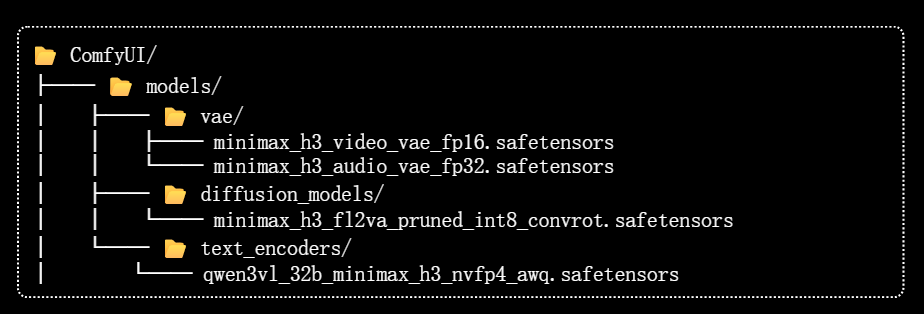
请务必注意路径的对应关系,特别是 VAE、Diffusion 模型(主体)和 Text Encoders(文本编码器,通常基于强大的开源 LLM 如 Qwen 等微调而来)。这些是生成高质量画面的基石。
第五章:实战演练——用 B70 激发 H3 的创作潜能
一切准备就绪,让我们进入最激动人心的实战环节。我们将分别演示“文生视频”和“图生视频”两大核心工作流。
5.1 工作流 01:Text-to-Video (文生视频)
Holding back tears: Real-life footage, fresh and delicate texture, reminiscent of the grand and imposing atmosphere, clothing, and makeup effects of the TV series *The Qin Empire*. 5 seconds, 16:9 landscape.

No background music, no BGM, no background music, no ambient sound, no wind, no birdsong.

Only the sounds of the character: breathing, swallowing, and speaking.

Refer to the character in the image.

[Shot 1] Medium close-up, fixed camera position. The character's face is positioned slightly above the center of the frame. The headdress is fully preserved, and the collar of a Qin Dynasty princess is visible below. Shallow depth of field focuses on the character's eyes and lips, clearly showing the opening and closing of the mouth, the fine lines on the lips, and changes in expression. Warm golden natural light shines from the front, creating a soft halo around the edges of the hair.

0-1 second, she looks at the person in the direction of the camera, her lips slightly parted and then closed. Hesitation is in her eyes, her gaze slightly fluctuating. A few strands of hair gently brush against her face.

1-2 seconds later, she took a deep breath (a clear inhale), her lips visibly parted, the tip of her tongue barely visible, poised to speak. Her eyes held a hint of urgency and a surge of courage.

2-2.8 seconds later, she abruptly stopped just before speaking, clenching her teeth and swallowing the words back—a clear swallowing motion (a clear swallowing sound) in her throat, her lower lip pulled back forcefully, her lips pressed tightly into a line, the corners of her mouth downturned slightly. The light in her eyes dimmed, replaced by struggle and restraint.

2.8-3.6 seconds later, she simply looked at the other person, her eyes filled with grievance and resentment. Her lips trembled slightly again, as if she wanted to speak again, but ultimately pressed them even tighter, her head lowering slightly.

3.6-4.5 seconds later, she looked up again, her gaze now showing weariness and resignation. Her lips parted clearly, and she murmured in a low, trembling voice, "那..." She paused for half a second, then reluctantly said, "那好吧"—her voice trailing off, until almost inaudible, filled with hesitation and restraint, her speech slow, as if she were struggling to utter it. There was a half-beat of silence before she spoke, the last syllable fading away softly.

After 4.5-5 seconds, as soon as she finished speaking, she turned her face away, no longer looking at the other person. Her long hair and pale yellow ribbon swayed gently with the turn of her head, the water droplet tassels in her hair swaying slightly. The final image was frozen in the moment her profile turned away.

[Ambient Sound] None. No wind, no birdsong, no rustling leaves. Only the sounds made by the character.

[Background Music] None. No background music, instrumental music, melody, or song throughout.

[Sound Control] Only the sounds made by the character: breathing, swallowing, and speaking. No ambient sound, no background music, no sound effects. The character only says the line "V-Well...okay then," with no other dialogue, narration, or inner thoughts.

[Facial Expression Control] The emotion is one of restraint and struggle, a reluctance to speak. Avoid crying, rage, excessive laughter, and overly exaggerated expressions. Lip movements should be obvious, and the voice should be clearly audible.以上为“文生视频”提示词。
我们直接在 ComfyUI 中导入预设好的 H3 文生视频工作流。由于 B70 拥有 32GB 的显存,我们无需为了省显存而去寻找压缩版的量化模型,可以直接加载全功能的大模型,确保画质的纯净度和细节的丰富度。
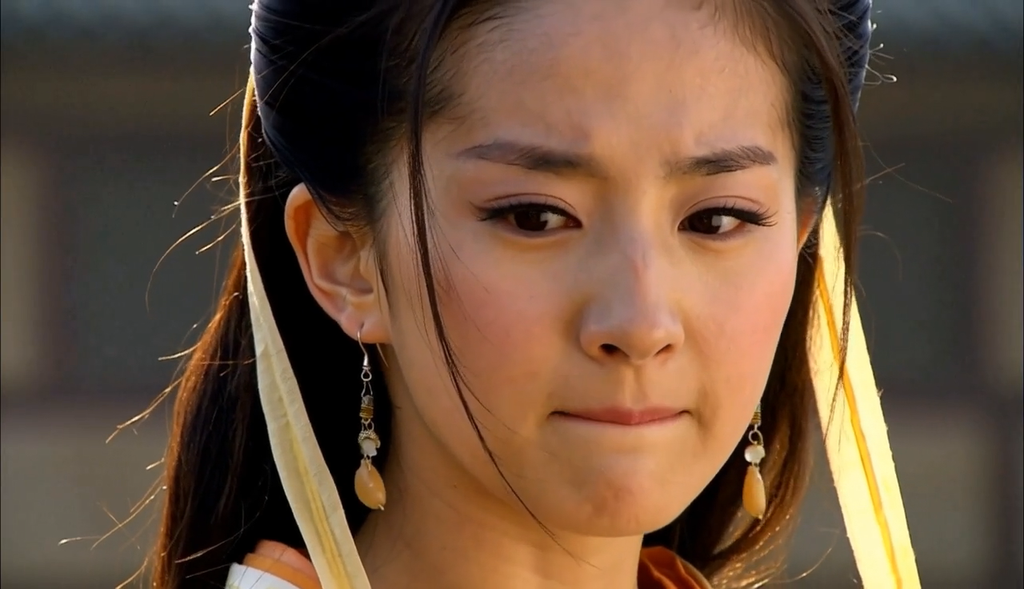
输入一段描述人物动作与神态的提示词(Prompt),点击生成。伴随着终端中进度条的推进,几分钟后,一段极具电影质感的短片便生成了。
从生成的刘亦菲风格的古装女性视频来看,H3 模型在人物面部细节、光影反射以及衣物材质的还原上,达到了令人惊叹的水准。更重要的是,视频的帧间连贯性极强,没有出现早期模型常见的画面闪烁或结构崩坏,效果直接拉满。
5.2 工作流 02:Image-to-Video (图生视频) 与武侠美学
相比于文生视频的随机性,图生视频(Image-to-Video)在实际商业生产中更具价值,因为它允许创作者精准控制视频的起始构图和视觉基调。
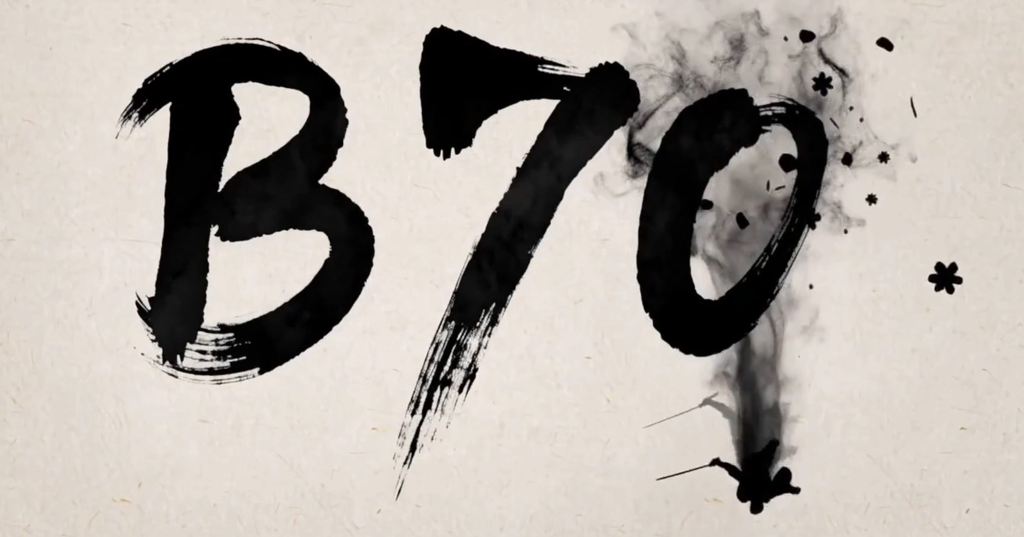
在这个测试中,我们挑选了一张极具中国传统韵味的“水墨武侠”剪影作为首帧参考图。这种带有1980年代香港武侠电影美学,结合了中国画留白与水墨晕染效果的画面,对 AI 的动态物理推演能力是一个巨大的考验。
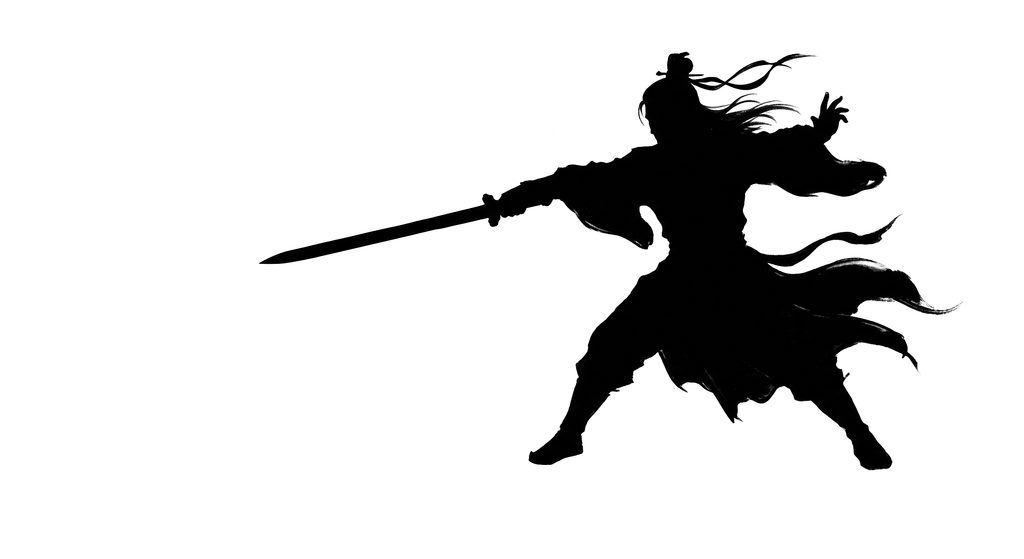
我们将素材载入工作流,设置好关键帧的动态参数。
For the target video, at the 0.00-second mark,

the content of <Image 1> (derived from [Shot 1]) is fully displayed.

Comprehensive multimodal description:

[Shot 1] presents a cinematic, high-speed, solo martial arts sequence in an ink-wash animation style. It utilizes a 16:9 landscape composition against a background of off-white *xuan* paper featuring vast areas of negative space; the color palette is strictly limited to black, white, and gray. The central figure—an ancient Chinese warrior with flowing long hair—is rendered entirely as a bold black ink silhouette without facial features, clad in traditional robes; his style, hairstyle, attire, and sword are consistent with [Image 1]. The action is highly dynamic throughout. As shown in [Image 1], the warrior dives from a height, captured mid-air while executing a sweeping sword strike; his long hair and robes flutter like trailing ink-wash brushstrokes. As the warrior descends through the frame, scattered ink-wash fragments of plum blossoms drift down—including whole petals, petal shards, scattered ink dots, and faint petal outlines. These are not intact flowers but fragmented pieces drifting in slow motion, transitioning from distinct petal shapes into fine particles before dissolving into the negative space. The warrior lands heavily, his feet striking the paper surface and triggering an outward-expanding shockwave of ink ripples. A wisp of smoke-like trailing vapor and an ink-wash afterimage left by his descent hover briefly before dissipating.

[Shot 2] At the 00:02.500 mark, the camera employs a high-speed, low-angle tracking shot as the warrior charges directly toward the strokes of the English letter "B"—with each stroke formed through active martial arts movements rather than passive running. Formation of the vertical stroke on the left side of the "B": After landing, the warrior fluidly transitions into a powerful forward knee strike; the knee slams down like a falling battle-axe, with the sword blade tracing closely alongside it. The moment the knee impacts the paper, it carves out a vertical ink mark and sends ink splattering outward. Formation of the top horizontal stroke: He immediately unleashes an explosive spinning back-fist attack, rotating his body 180 degrees. His fist and sword trace a horizontal arc, powerfully outlining the ear-like stroke on the right, while the point of impact kicks up a spray of ink. The bottom horizontal stroke: He leaps into a flying side-kick, his leg fully extended in mid-air, sweeping across the paper like a horizontal split; the sole of his foot traces the bottom stroke while the sword in his hand slashes parallel above it—the combined force of these two movements completes the letter "B." There is no wasted motion between strikes; he instantly switches to the next stance without transitional pauses, each change of move accompanied by an explosive burst of ink-smoke. A lingering trail of dark ink-smoke follows him like a comet's tail—dense and heavy near his body, gradually dissipating outward, accompanied by overlapping, semi-transparent silhouettes of his various combat stances that trail behind and slowly fade.

[Shot 3] At 00:05.000, the camera executes a whip-pan around the warrior, capturing a spiraling flip after his leap—his body spins three times, the sword tip trailing a spiral vortex of ink, while the rotation kicks up concentric rings of ink-smoke and petal fragments. Upon landing, he executes a martial arts combo to write the second character, "7": a low sweeping kick traces the top horizontal stroke; a sideways elbow strike outlines the downward curve; and finally, he leaps upward with a "piercing palm" strike (palm and sword moving in unison) to draw the vertical stroke on the right. Each strike causes ink to splatter at the points where the strokes intersect. The trail of ink-smoke grows increasingly dense with the rotation, forming a thick, black ribbon-like band; overlapping afterimages of the combat stance layer and dissipate like echoes in a time-lapse sequence.

[Shot 4] At 00:07.500, the camera pulls back rapidly while rising (pedestal-up) as the warrior executes a final combo to inscribe the third character, "0": a spinning hook kick traces the left vertical stroke, a forward palm-strike and chop draw the horizontal cross-stroke, and a high-leaping, double-spinning sword maneuver—sword raised high—generates a spiral of ink and a column of smoke. A downward sword arc traces a long diagonal line, concluding with a heavy "axe-kick" stomp that forms the final hook stroke—triggering a massive, radial explosion of ink. At this moment, the ink-smoke trail reaches peak density—a thick black band uniting the three characters into a single, fluid stroke. Amidst the high-speed movement, the outlines of the afterimages trailing behind become elongated and blurred. Each point of impact sends forth plum-blossom-shaped ink fragments that subsequently dissolve into scattered ink droplets.

[Shot 5] At timecode 00:09.000, the action freezes in an extreme high-angle long shot, framed vertically: the warrior has sprinted out from the bottom edge of the frame, leaving behind only a fading ink trail, a wisp of dissipating smoke, and scattering petal fragments. Across the paper surface, three massive, bold, black ink-brushed characters appear, arranged horizontally to spell "B70": the "B" on the left is formed by a combination of a knee strike and a backfist; the "7" in the center by a spinning leap and an upward elbow strike; and the "0" on the right by a hook kick and the final axe-kick stomp. These three characters are clearly visible and easily recognizable within the frame. Every stroke is saturated with wet, thick ink and features "flying white" (dry-brush) effects. At the points of swiftest brushwork, a burst of raw power is visible; plum-blossom-like ink splatters scatter around each character, dissolving into fine particles, while wisps of ink-smoke curl between the characters, as if an invisible hand holding the brush were stitching them together. A tiny silhouette of a martial artist appears at the very bottom of the frame—blurred and fading, with half the figure extending beyond the image border—while the trajectory of their sword stroke connects seamlessly to the final stroke of the character "0."

Overall Soundscape: The soft, tinkling sounds of plum blossom petals drifting and shattering in mid-air intertwine with the heavy thud of the martial artist landing; sharp combat sound effects—knee strikes, heavy punches, powerful kicks—are each accompanied by the whistling sound of a sword blade slicing through the air; subtle scratching and hissing sounds emerge as the brushstrokes set and the searing ink seeps into the paper fibers; the rush of wind stirred by the figure's movement and the hissing trail of smoke left in their wake; the final heavy stomp triggers a dull, massive sound of paper tearing—like an axe blow—followed by a return to silence, punctuated only by the faint sounds of ink droplets splashing and petals dissolving.

Non-narrative Music: As the petals scatter at the opening, a cold, ethereal *guqin* harmonic resonates through the sparse negative space; during a rapid succession of knee strikes, a *taiko* drum roll drives the tempo forward, while the sharp, rapid *pipa* tremolo pierces through the mix during a spinning move; as the third character takes shape during a dash, the music builds to a thunderous full-orchestra climax with crashing cymbals; in the final wide shot, the music resolves into three sustained *guqin* notes—corresponding to each character—before fading into silence.以上为“图生视频”的提示词。
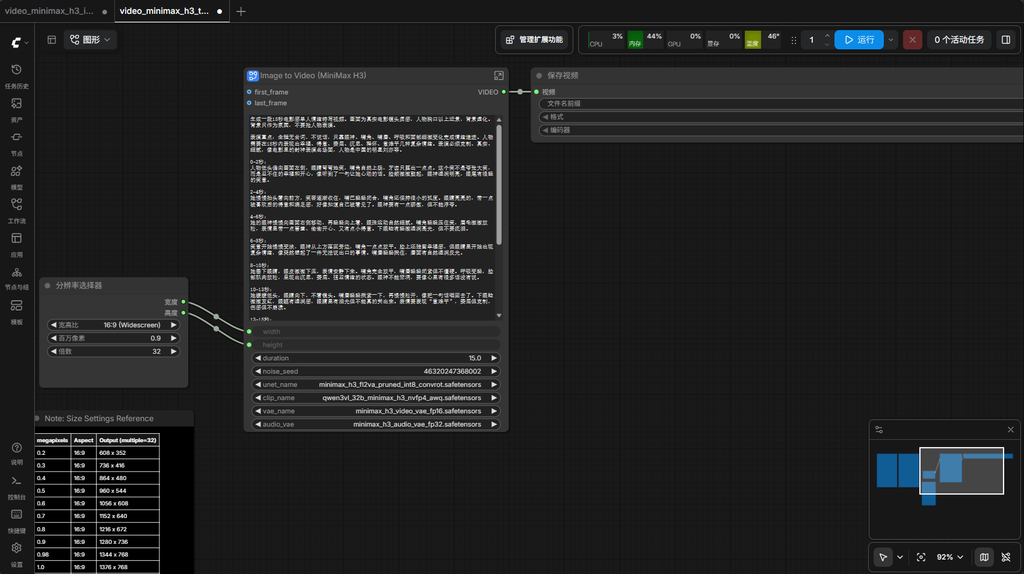
结果令人感到非常震撼。静止的剪影瞬间被赋予了生命。剑客腾空而起,身后的水墨如同有实质的烟雾般翻滚扩散,落叶飘零的动态轨迹极其自然,最后画面定格在一个极具冲击力的毛笔字“B70”上。
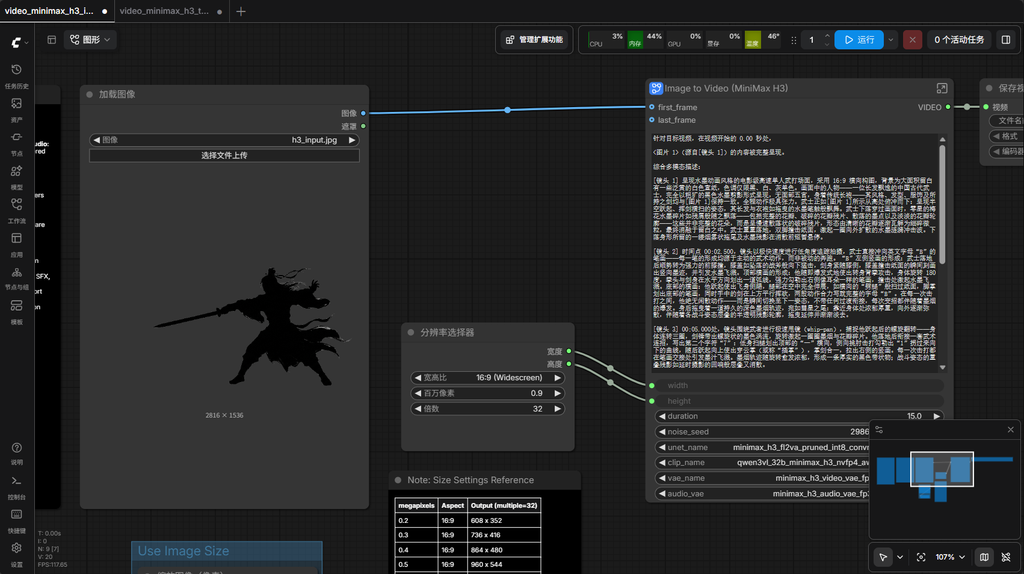
整个动画过程将水墨的流体动力学与武侠动作的凌厉感结合得天衣无缝。这不仅证明了 MiniMax H3 强大的生成能力,也完美验证了 B70 显卡在处理高复杂度动态图层时的游刃有余。
5.3 稳定性与极限压力测试
对于一套生产力工具来说,偶尔跑成功一次说明不了问题,持续高负载下的稳定性才是关键。
在过去的几天里,我一直使用这套“B70 + H3”的组合进行频繁的测试。无论是在各种分辨率之间切换,还是进行连续的批量排队生成测试,这套系统都表现出了惊人的稳定性。
特别是在测试极限边界时,我们在默认分辨率下强制生成长达 30 秒的连续视频。得益于 32GB 的显存缓冲池,系统依然稳如泰山,没有出现任何崩溃退出的现象。这在许多16GB甚至24GB显卡上是很难想象的——它们往往在生成到一半时就会因为显存溢出而终止。
可以说,B70 大显存的优势,在这里转化为了实实在在的“生产力安全感”。
第六章:结语与展望
从测试结果来看,如果要在当前市面上寻找一款专门用于本地运行 MiniMax H3(以及未来各种高显存需求的视频模型),且追求极致性价比的显卡,Intel Arc Pro B70 绝对是当之无愧的头号黑马。
它以一半的价格,不仅提供了媲美顶级消费卡的生成速度,更赋予了创作者 32GB 的海量显存。这对于那些希望摆脱云平台限制、构建私有化数字资产生产线的工作室或极客玩家来说,是一个极具战略眼光的投资。
科技的进步,其终极目的应当是平权。MiniMax H3 的开源,让顶级的算法走出了实验室;而像 B70 这样高性价比硬件的普及,则为这些算法铺设了通往千家万户的宽广道路。
在智宅客(zhizhaike.com),我们始终坚信,AI 不应仅仅是少数精英的专属玩具,它更应该是一种赋能每一个人的“数字生活方式”。我们将继续专注于探索 AI 时代的软硬件结合方案,教大家如何在这个智能涌现的时代,更好地运用技术,点亮创意。
如果您对这套方案感兴趣,或者在部署过程中遇到了任何问题,欢迎加微信骚扰我们,感谢您的阅读!
(本文首发于智宅客 zhizhaike.com,专注于 AI 技术与数字生活方式的探索。)
订阅智宅客
AI / 技术 / 数字生活方式,新文章第一时间送到邮箱。